


If fails to read a Chevrolet or Daewoo Delphi MR-140 ECU with OBDSTAR DC706, fix your pinout.
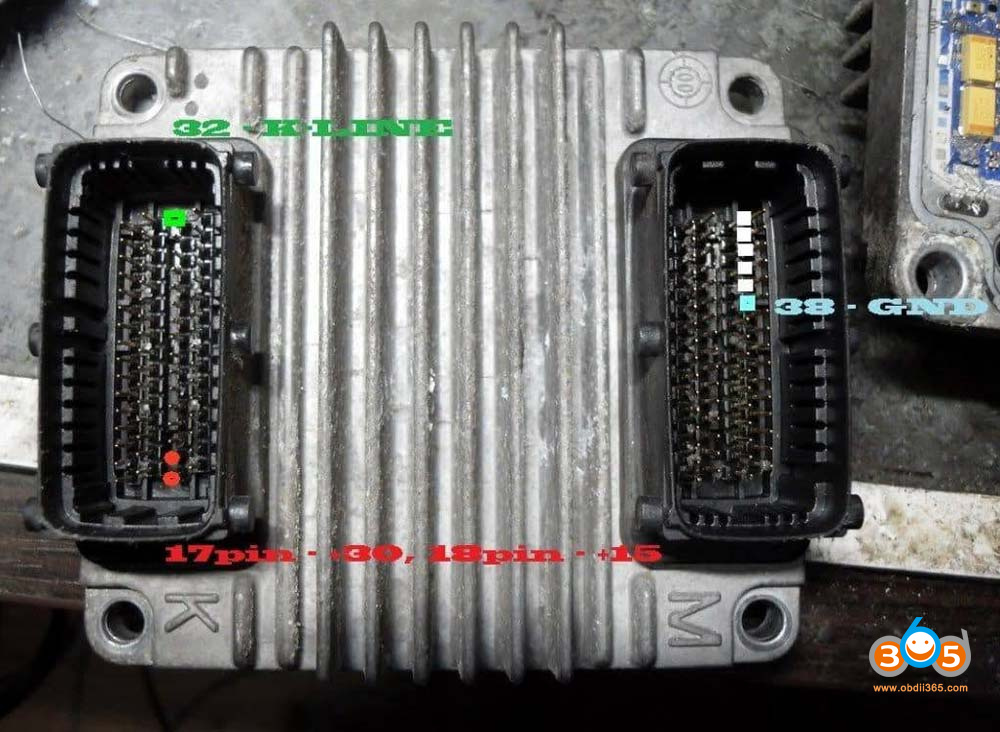
This is the bench wiring diagram in the device.

The numbers are upside down. Example line k is 32. Not the 17th.
Here is the correct pinout.
Credit to Ramirez.

Pin Function
K1 and K17 +12V constant (both)
K18 +12V Ignition / Contact
K32 K-Line (communication) ← It is NOT 17 as the drawing says M37, M38, M39, M40, M41 Ground/GND (connect at least 2 or 3 together)
K4 Pin BOOT (only if it asks for special mode)
In your drawing on the screen K32 appears as if it were pin 17 → it is backwards, pin 32 is the one of the K-Line.
Step by step to connect:
1. I corrected the K-Line to pin K32 (not 17)
2. Connect +12V to K1 and K17 together
3. Connect 2 or 3 masses M37+M38+M39
4. Turn on the source → wait 10 seconds
5. Give +12V to K18 (ignition)
6. Just now → start the connection from the computer
7. If it asks you → connect K4 to +5V/+12V and try again
90% of cases fail due to the wrong K-Line pin or lack of multiple masses.
Try the correct pinout, and take a good power supply (5amp min and 12v), it was tested working without issue.


FYI:
Carprog also read this ecu using this pinout.
carprog pinout for Delphi MR-140
M37, M38, M39, M40, M41 – ground
K1, K17 – +12
K18 – ignition
K32 – K-line
K4 – boot















